


Important information for the day of MEAD 2026
If you have any additional questions feel free to email us at math-crr@arizona.edu
Below you will find directions for:
Conference Schedule
Sched Webpage and Mobile App
Help Desk and Internet Access
Session Evaluations and PD Certificates
Menus, Maps, and Directions
MEAD Raffle Prizes and Not Quite Junk
CONFERENCE SCHEDULE
Below are two different drop-downs: One to describe the schedule for In-Person Participants, and one for Virtual Participants.
This is the schedule outline for what your day will look like at MEAD if you are attending IN-PERSON.
- Registration opens at 7:00 AM in the Tucson High Magnet School (THMS) Cafeteria.
- Please have the Sched mobile app downloaded and signed in on your phone!
- A buffet breakfast will begin at 7:30 AM in the THMS Cafeteria.
- You can access the breakfast menu here.
- Conference Sessions will take place from 8:00 AM - 11:40 AM in the THMS Technology Building.
- Complete the Session Evaluations for each session you attend.
- A Help Desk will be available to offer tech support and address any other issues you may have.
- The Cafeteria will host the Exhibition Hall where you can visit conference exhibitors before and in between sessions.
- Be sure to check out our large selection of raffle prizes and sign up for the opportunity to win one prize. (Winners will be notified via email and prize pick up will take place at the UA Student Union Grand Ballroom Lobby before the Keynote Luncheon.)
- Don't forget to visit the Not Quite Junk tables.
- After the morning conference sessions, we will provide shuttles for easy transportation from THMS to the UA Student Union Grand Ballroom where the Keynote Luncheon is held.
- Lunch will be served at 12:00 PM and the Keynote Address will be from 12:15 PM - 2:00 PM. Make sure to stick around for the announcement of our Teacher Awards!
- You can access the lunch menu here.
- At the end of your conference day, fill out the General Conference Evaluation (Under the "Info" tab of the Sched mobile App).
This is the schedule outline for what your day will look like at MEAD if you are attending ONLINE.
- Login to https://mead2026.sched.com.
- A Virtual Help Desk will be available starting at 7:15am to offer tech support and address any issues you may have, including session cancelations. You are also able to find it at the top of every page in Sched!
- Find your schedule by clicking on ‘’My Schedule".
- If you need help with your schedule, you can view this Sched support page: https://sched.com/guide/your-personalized-schedule/
- Attend the sessions in your schedule by clicking on the yellow "Open Zoom" button for a session.
- Make sure you to download and update Zoom, and that your camera is on during sessions!
- Complete the Virtual Prizes Google form for your chance to win a prize.
- Complete the Google form and select the two (2) prizes you would like to be entered for.
- Winners will be selected and notified via email the week after MEAD.
- Prizes will be emailed or mailed to winners the following week.
- Complete the Session Evaluation for each session you attend (the Red button on Sched sessions for computer and the Gray button for the mobile app.)
- The Keynote Address by Cathery Yeh (12:15 PM - 2 PM) is automatically added to your schedule so that you can easily find the link to join the live stream of the address.
- Stay until the end for the announcement of this year’s recipients of the Teacher Awards!
- At the end of your conference day, fill out the General Conference Evaluation (In the header of every Sched webpage or under the "Info" tab of the Sched mobile App)
Sched Webpage and Mobile App
On the day of MEAD, the Sched webpage and mobile app will be essential for accessing conference information and getting to where you need to be.
- If you can’t log into Sched and need to reset your password, click here: https://mead2026.sched.com/password-reset. Enter the email you used for registration and you will receive a reset link.
Please review or make your session selections NOW and check if any of your sessions have documents to download beforehand.
- You can check your schedule at any time by clicking on "My Schedule".
- The Keynote Address by Cathery Yeh (12:15 PM - 2 PM) is automatically added to your schedule.
- You will receive an email from Sched on the morning of MEAD with your schedule for the day.
Please complete Session Evaluations on Sched for each session you attend, including the keynote address.
- The Session Evaluation button will be red for those viewing sessions on a web browser, and gray for those on the Sched mobile app.
At the end of your conference day as well, please fill out the General Conference Evaluation (in the header of every Sched webpage or under the "Info" tab of the mobile app).
For In-Person Participants:
Please watch this video to learn how to download and use the Sched App: https://sched.com/guide/app-tour-for-attendees/
- By clicking on “Directory” at the bottom of the screen you can find the list of Presenters, Sponsors, Exhibitors, and Participants.
- If you click on “Info” at the bottom of the screen, you can see the Venue Map, FAQs, and other conference information.
- To find the room number where your session will be held, simply go to your schedule and click on a session. Then, scroll down to find the room number.
Help Desk
- In-Person Participants: A Help Desk will be available in the Cafeteria to offer tech support and address any other issues you may have!
- Virtual Participants: If you need immediate help on the day of MEAD, a Virtual Help Desk will be available throughout the day. You can access the link at the top of any Sched page:
- Virtual Help Desk Link (Opens at 7:15am): https://arizona.zoom.us/j/86535365661
Internet Access
- For Wifi at the Tucson High Magnet School, you’ll need to select “TUSD_Open”, get the website open to the “Acceptable Use Policy page”, scroll the “use page” all the way down then click the “Accept” button, and once accepted you’ll be connected!
Session Evaluations and PD Certificates
- It is vital that after a session you attend ends, you immediately complete the Session evaluation form on Sched.
- You can find the evaluation by clicking on the session in Sched, and then clicking the Session Evaluation button.
- You must also complete the General Conference Survey (in the header of every Sched webpage or on the "Info" tab of the mobile app).
- Evaluations must be completed by January 30th, 2026.
Professional Development hours will be provided for completed evaluations.
Menus
A buffet breakfast will be provided in the Tucson High Cafeteria starting at 7:30am.
- You can access the breakfast menu here.
A buffet lunch will be provided during the Keynote Address, 12-2pm.
You can access the lunch menu here.
Maps and Directions
Directions and Parking:
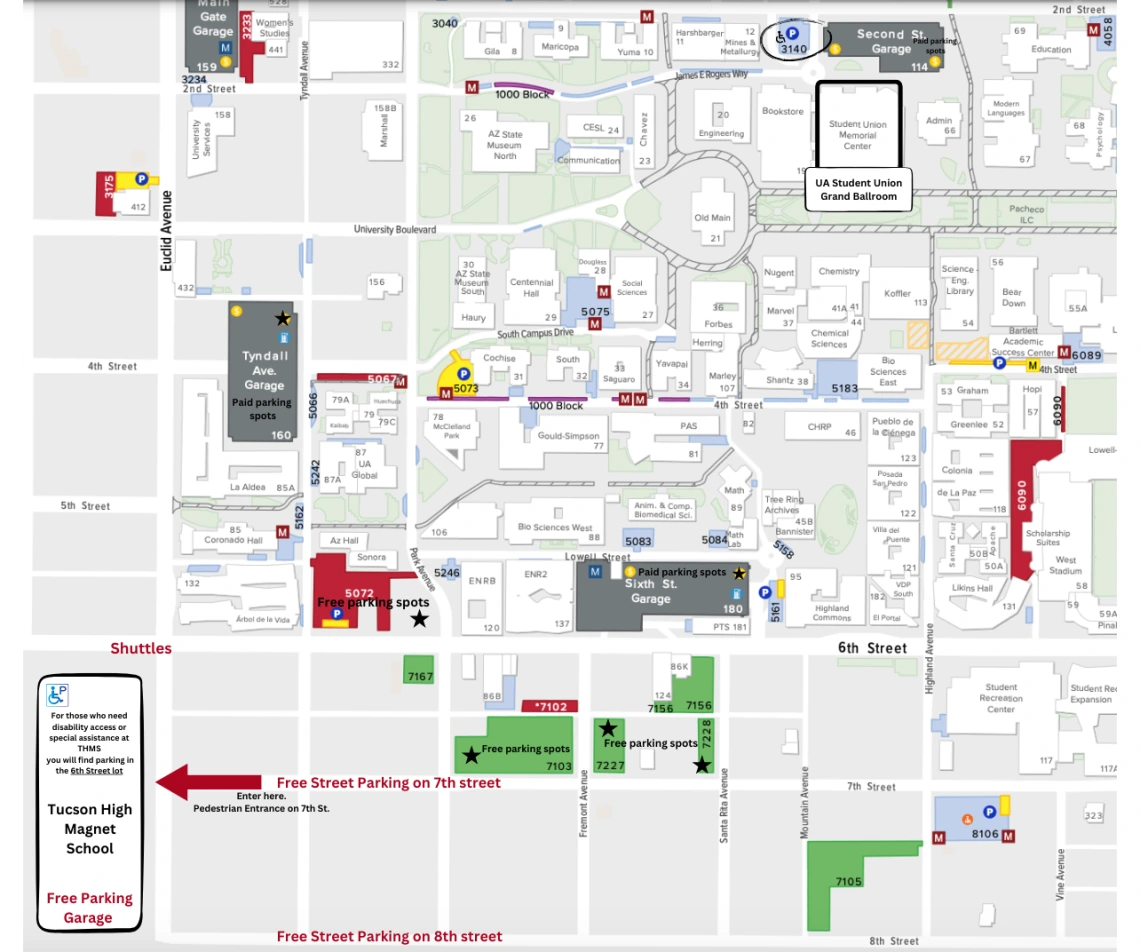
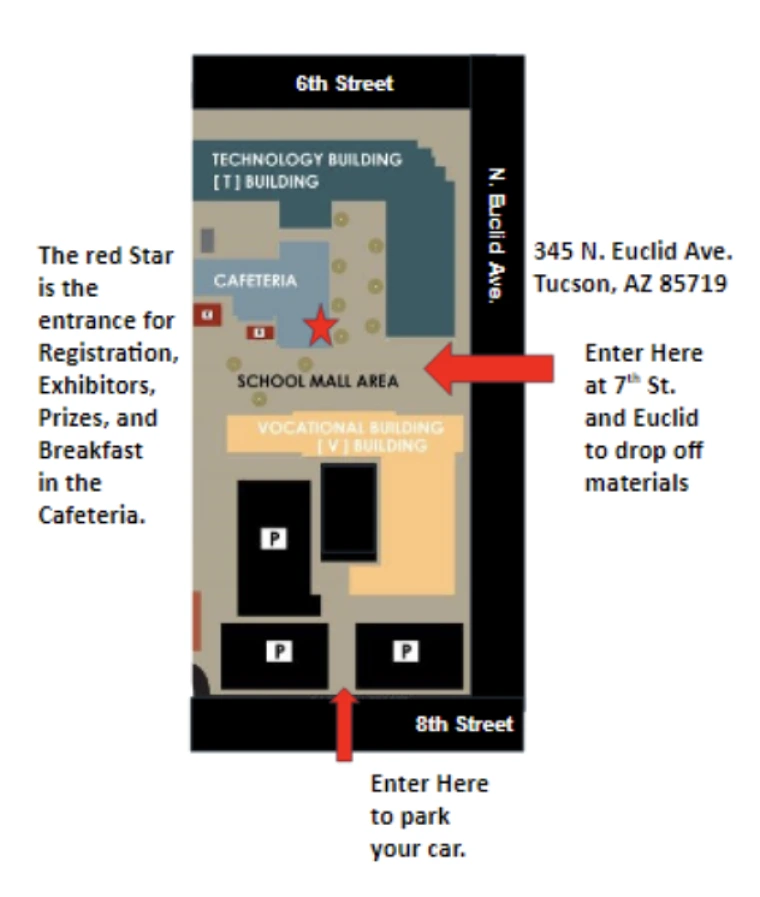
Below you will find Maps and Directions for the day of MEAD. This includes Parking at Tucson High Magnet School (THMS), Parking lots and street parking, Directions to the High School, Parking for the Luncheon, and Directions to find the Grand Ballroom.
- NOTE: There is very limited parking at Tucson High Magnet School (THMS). Alternative parking is on the streets in the neighborhoods directly east and south of THMS. There are also UA surface lots that are free on weekends.
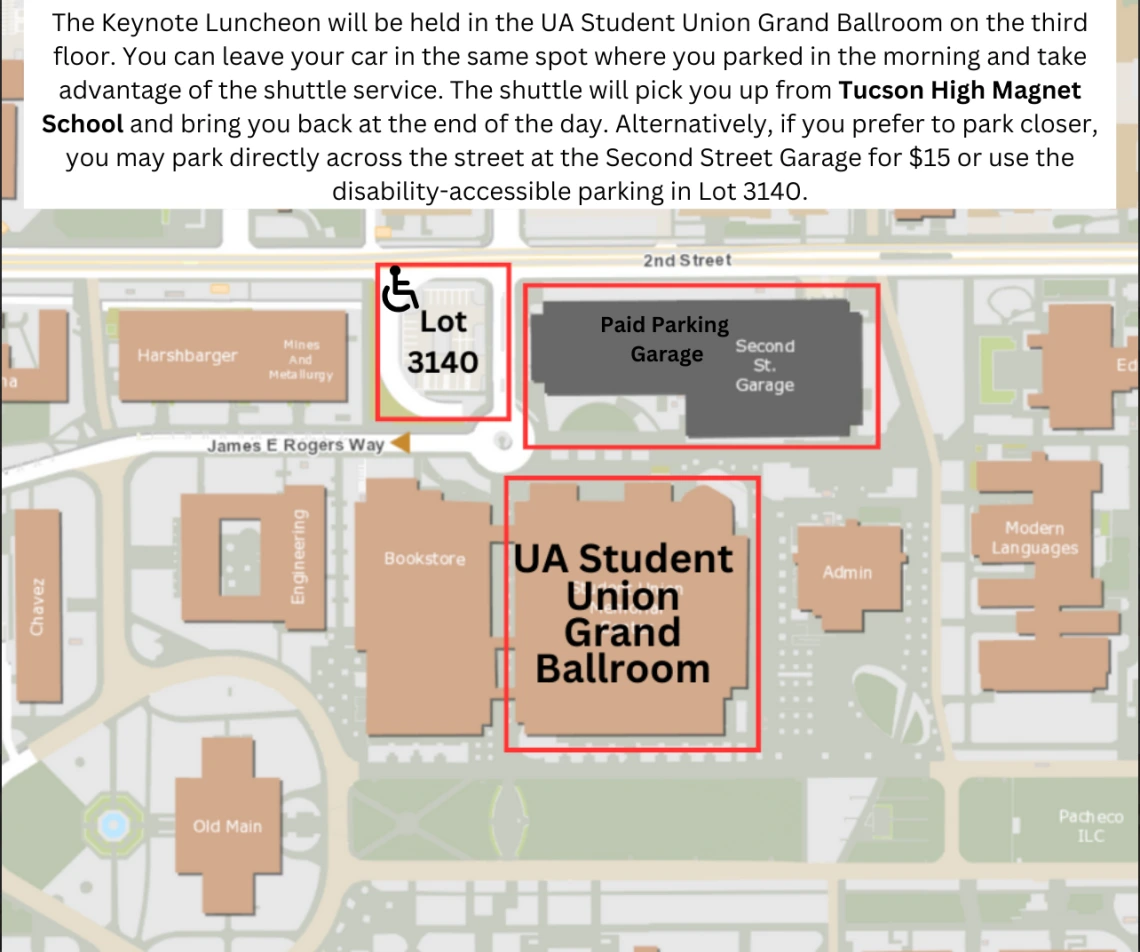
- We DO NOT recommend parking in University garages, as you will be required to pay. Additionally, avoid the 2nd Street Garage due to other UA campus events that increase the price to $15–$20.
- To assist with transportation, we will provide a shuttle bus after the morning conference sessions to transport you from THMS to the Keynote Luncheon, and then back to THMS at the end of the day.
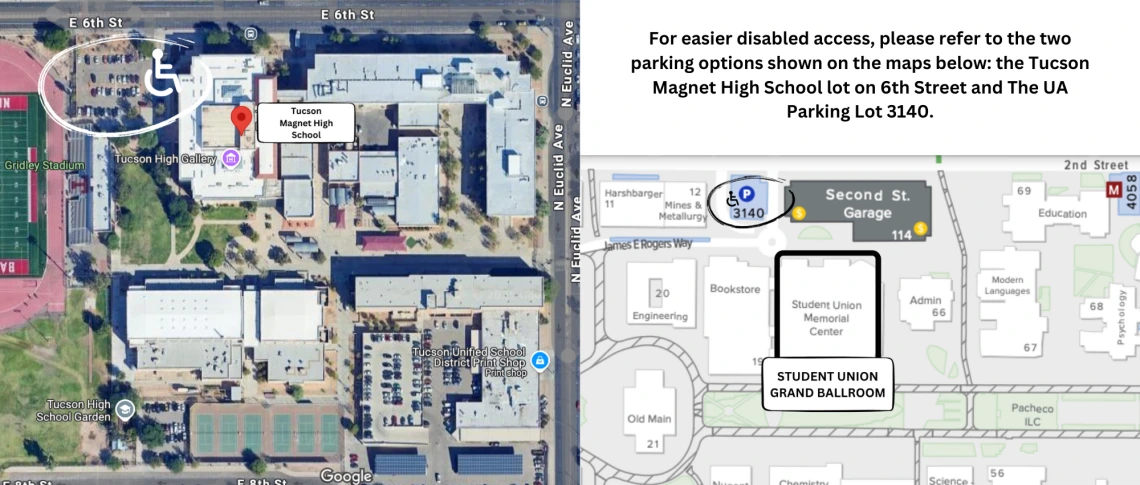
- For those who need disability access or special assistance at THMS, you will find parking in the 6th Street lot.
- For those who need disability access or special assistance at the Keynote Luncheon, you will find parking just west of 2nd Street Garage in Lot 3140.
Click Here for Tucson High Magnet School Entrance for MEAD
Click Here for UA Grand Ballroom Location for the Keynote Luncheon
MEAD Raffle Prizes
As a way to show appreciation for Arizona teachers, many generous businesses and organizations have donated prizes to be raffled to MEAD participants.
There are two prize lists: One for IN-PERSON and one for VIRTUAL participants. Please submit the form that matches your conference ticket. Only one submission per person. Duplicate entries will be deleted.
IN-PERSON Prizes:
At registration in the THMS Cafeteria, prizes will be displayed with a QR code for each item.
How to enter:
- Choose the ONE prize you would like to win.
- Scan the corresponding QR code.
- Complete the online form on the BetterWorld.org platform.
- Enter your first name, last name, email, and create a password.
- Confirm that this is the only prize you have submitted an entry for.
- Verify that you are not a robot and submit.
- You will receive a confirmation email once your entry is received. Check your Spam folder.
All entries must be completed by 10:40 AM.
Winners will receive a second email by 11:55 AM and can pick up their prize in the lobby outside the UA Grand Ballroom before the Keynote Luncheon and must be present to win.
VIRTUAL Prizes:
Virtual attendees will receive a Google Form link on the day of the event.
How to enter:
- Complete the Google form and select the TWO (2) prizes you would like to be entered for.
- Virtual Prize Form: https://forms.gle/tZeH4G1Y35t9rxyU7 (Form opens morning of MEAD))
- Winners will be selected and notified via email the week after MEAD.
- Prizes will be emailed or mailed to winners the following week.
Whether you win a prize or not, we encourage you to show your appreciation by supporting the businesses and organizations that have generously contributed to MEAD 2026.
Thank you on behalf of the MEAD Conference!
List of Raffle Prizes for MEAD 2026
Not Quite Junk
IMPORTANT NOTICE: This year, Not Quite Junk will operate a bit differently compared to previous years in that selections will no longer be raffled off. Instead, Not Quite Junk materials are available on a first-come, first-served basis, as long as supplies last. Teachers may select only one pile (please do not cherry-pick from multiple piles). Teachers are expected to keep their selected pile with them throughout the conference, so please plan to bring a tote bag or box. Although teachers are limited to one pile during the earlier sessions, Not Quite Junk will close at the start of the third session. Therefore, during the break between the second and third sessions (10:20–10:40), conference attendees are invited to return and make one additional selection if they wish, as long as materials are still available.
For conference attendees who are new to MEAD, Not Quite Junk—located in the Tucson High Cafeteria—features a collection of tables where in-person participants can leave gently used educational supplies and materials (such as manipulatives, books, posters, whiteboards, technology, storage bins, and more) and/or pick up items that may be useful in their own classrooms.
Please reach out to Ariel Beggs via email: abeggs@arizona.edu if you have any questions or concerns about Not Quite Junk.
Special thanks to the MEAD Steering Committee, AmeriCorps members, volunteers, prize donors, and sponsors for making MEAD possible!

